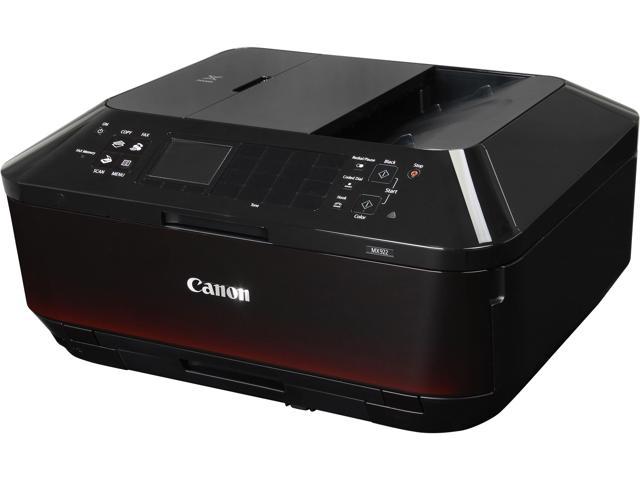
Canon Office and Business MX922 Is Great For Small Office Needs

The MX922 prints, scans, and copies in duplex, connects over Wi-Fi, USB, or Ethernet, and installs without trouble. Its main weaknesses are a confusing control layout, where some functions sit only on the action buttons and others only on the cursor pad, and a short one-year warranty. Paper capacity is about 250 sheets in the bottom cassette, plus a 20-sheet photo tray, and the article calls its photos and graphics sharp and accurate. Canon doesn’t publish a duty cycle, so the article advises upgrading if you regularly print more than 250 to 500 pages a month.

Continue ReadingCanon Office and Business MX922 Is Great For Small Office Needs

Ways To Keep Printers Running Smoothly For Years

The article gives five habits for fewer errors and jams. Turn the machine off and keep hands clear of moving parts and the hot fuser, clean clogged printheads when white lines show, and vacuum dust instead of using canned air. When paper jams, pull the sheet out gently, and consider the maker’s maintenance kit for worn parts such as rollers. Overcleaning wastes ink, so follow the manual and the machine’s self-clean function.

Continue ReadingWays To Keep Printers Running Smoothly For Years

Here’s How To Find The Right MSP Team

An MSP handles a company’s IT on an ongoing basis, with system monitoring, data management, and security software, usually for a flat monthly payment. The article says there are too many providers to choose from, so judge them on how well they listen, what they offer, and how transparent they are. A good sign is a provider that asks about your goals and workflow before talking about price. Look for round-the-clock support and tools such as asset inventory management, detailed work audits, and warranty tracking.

Continue ReadingHere’s How To Find The Right MSP Team

Can You Lay a Copier on Its Side?

Copiers are heavy and sensitive inside, so tilting one onto its side risks damaging components and hurting someone. The article says to prepare the machine before any move, which can include removing the drum or locking the optics, and to ask your service provider how. A machine on wheels is easier to roll to an elevator or truck, but other units need extra help even for a short move. For leased copiers, call the provider, since a professional move costs less than replacing a damaged machine.

Continue ReadingCan You Lay a Copier on Its Side?

Best Features Xerox WorkCentre 6505/DN It Offers

The article presents the 6505/DN as an easy-to-install office color MFP with a simple control panel. It praises crisp text, strong image output, and clear scans and monochrome copies, which it says counters the idea that office machines sacrifice quality. Paper handling covers custom sizes through the manual feed and tray 1, an optional second tray, and media such as card stock, glossy paper, envelopes, and labels. The speeds it quotes are modest, so check them against Xerox’s sheet and weigh them against your volume.

Continue ReadingBest Features Xerox WorkCentre 6505/DN It Offers

The Difference between Copier Rental or Copier Lease

The article compares renting a copier to renting a car: short-term, flexible, and you stop whenever the need ends. Leasing is a longer contract, usually with service and fixed payments, and it costs more than an outright purchase and can’t simply be dropped. It suggests renting under about 700 copies a month, leasing near 1,000, and renting for short projects or a young business that wants to avoid commitment. Many businesses upgrade after three or four years because older machines cost more to maintain and lack current features.

Continue ReadingThe Difference between Copier Rental or Copier Lease

Stay on Top with Printer Lease Tailored to Your Needs

A lease puts a copier or printer in your office under a contract and typically bundles service, software, and consumables into the package. The article lists the benefits as bundled maintenance, flexible payment terms, easy upgrades, and technicians who keep downtime low. It says the provider services a wide range of equipment, including copiers, multifunction devices, networks, scanners, plotters, shredders, and franking machines. The page makes many claims without terms or prices, so check what each one means in a real contract.

Continue ReadingStay on Top with Printer Lease Tailored to Your Needs

What To Look For In a Multifunction Printer

A multifunction printer, also called an MFP or copier, combines printing, copying, scanning, and faxing, and many also do email, finishing, and wireless or mobile jobs. The article lists its advantages as lower power use with energy-saving modes, one machine replacing several, shared use across teams, and lower overall cost through digitized documents. For scanning, it says to look for a flatbed, an automatic document feeder, network or USB scanning, and slide and transparency capability. It also stresses after-sales support, meaning quick repairs and parts, and mentions leasing or renting as options to plan around.

Continue ReadingWhat To Look For In a Multifunction Printer

Characteristics of Laser Copiers That You Can’t Find In Inkjets

The article compares the two printing methods: an inkjet sprays tiny drops of liquid ink through micro-nozzles, while a laser copier uses toner powder transferred by an electrostatic charge and bonded with heat. Lasers have no dried-ink maintenance problem, produce crisp, smudge-proof text, and suit bulk printing, though they cost more upfront and last longer. Inkjets handle color images and photos well but can smudge, bleed slightly, and clog when idle. If the upfront price is a concern, leasing a copier spreads the cost.

Continue ReadingCharacteristics of Laser Copiers That You Can’t Find In Inkjets